TV Screen Problems: Causes, Solutions & Repair Costs
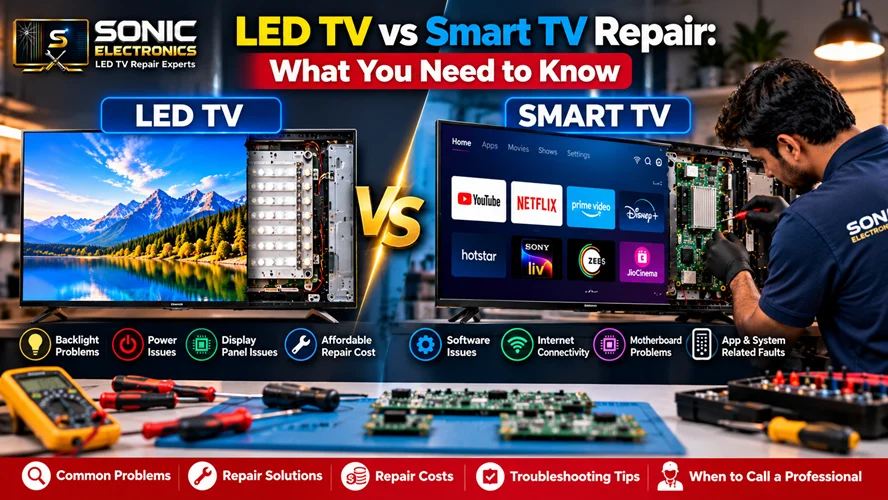
If your television has started acting up, you’ve probably searched online and noticed something confusing right away: some articles talk about “LED TV repair” while others talk about “Smart TV repair,” almost as if these are two completely different appliances. In reality, most TVs sold today are both LED and Smart at the same time, but the repair process for each side of the TV is genuinely different. Understanding this difference can save you money, help you explain the problem accurately to a technician, and stop you from paying for repairs you don’t actually need.
LED TV and Smart TV Are Not Competing Categories
“LED” refers to the display technology — the physical panel and backlighting system that produces the picture you see. “Smart” refers to the software layer — the operating system, apps, Wi-Fi connectivity, and streaming features built into the television. A modern TV is almost always both: an LED panel running a Smart TV operating system like Android TV, Tizen, WebOS, or Roku OS.
This matters because when your TV breaks, the fault usually lives in one of these two layers, not both. A cracked screen or backlight failure has nothing to do with your Netflix app crashing. Knowing which layer is at fault helps you (and your repair technician) target the actual problem instead of guessing.
Common LED TV Hardware Problems
LED TV repairs deal with the physical components of the television. These issues tend to be electrical or mechanical in nature and often require opening up the TV.
Backlight failure is one of the most frequent LED TV issues. You might notice the screen is completely black, but you can still faintly see a picture if you shine a flashlight on it. This usually means the LED backlight strips have failed, while the actual LCD panel is fine.
Dead pixels or lines on screen show up as small colored dots that never change, or thin horizontal/vertical lines running across the display. This often points to a damaged panel or a loose ribbon cable connection.
Power supply board failure causes the TV to not turn on at all, or to turn on and immediately shut off. The power light might blink in a pattern, which is often a diagnostic code for technicians.
Capacitor damage is common in areas with unstable electricity supply. Bulging or leaking capacitors on the power board are a classic sign, and this is a relatively affordable and quick fix for an experienced technician.
Physical screen damage from impact, such as cracks or pressure spots, unfortunately usually means the entire panel needs replacing, which can be a costly repair depending on the TV’s age and size.
Common Smart TV Software Problems
Smart TV repairs are a completely different category — they involve the TV’s internal computer, its operating system, and its connected services.
Apps crashing or freezing is extremely common, especially on TVs that are a few years old and haven’t had storage or memory upgrades. The fix is often as simple as clearing app cache or reinstalling the app.
Wi-Fi connectivity issues can stem from outdated firmware, a failing Wi-Fi module, or router compatibility problems. Sometimes a simple factory reset resolves this; other times the internal Wi-Fi chip needs replacement.
Slow or laggy interface happens as Smart TVs age, since their internal processors and storage don’t get faster over time the way phones do with updates. A firmware update can help, but severe lag usually means the hardware has simply reached its limit.
Software update failures can leave a TV stuck on a boot screen or in a reboot loop. This typically requires a technician to manually flash the firmware using specialized tools.
Account and login issues with streaming platforms are usually not a TV problem at all — they’re server-side or account-related, and no repair technician can fix Netflix’s servers being down.
How to Tell Which Type of Repair You Need
Ask yourself: does the problem happen with the picture and sound regardless of what you’re watching (cable, HDMI, apps)? That’s likely an LED/hardware issue. Does the problem only happen inside apps or the home screen, while an HDMI-connected device still displays fine? That’s likely a Smart TV/software issue.
Should You Repair or Replace?
Cost is the deciding factor for most people. A backlight or capacitor repair on an LED TV is usually inexpensive and worth doing. A full panel replacement, on the other hand, can cost 60-70% of a new TV’s price, making replacement the smarter financial choice in many cases. Software issues are almost always worth fixing since they rarely involve expensive parts.
Get Professional Help Instead of Guessing
TV internals carry live electrical charge even when unplugged, due to capacitors storing residual power, so DIY repair carries real risk of injury or further damage. If you’re in the Kaushambi, Ghaziabad area and dealing with either display issues or Smart TV software glitches, it’s worth reaching out to a professional TV repair service in Kaushambi, Ghaziabad rather than attempting a fix yourself. A qualified technician can quickly diagnose whether you’re facing a hardware or software issue and give you an honest cost estimate before doing any work.
Frequently Asked Questions
1. Is every LED TV also a Smart TV?
Not necessarily. Basic LED TVs without internet connectivity or app support are still sold, especially at lower price points. However, the vast majority of LED TVs manufactured in the last several years include Smart TV functionality built in.
2. Can a software problem damage the TV’s hardware?
This is rare, but it can happen. A severely corrupted firmware update, for instance, can sometimes cause the TV to become completely unresponsive, requiring a technician to reflash the system using specialized tools rather than a simple restart.
3. Why does my Smart TV feel slower after a few years, even though nothing seems broken?
Smart TVs run on fixed internal hardware — processor, RAM, and storage — that doesn’t upgrade over time. As apps get bigger and more demanding, older TVs simply struggle to keep up, similar to how an old smartphone slows down with newer app versions.
4. Is it cheaper to fix a backlight issue or replace the whole panel?
Backlight repairs are almost always significantly cheaper than panel replacement. If your technician says the LCD panel itself is cracked or damaged, that’s usually when replacement costs climb close to buying a new television.
5. Can I fix Smart TV software issues myself?
Many minor issues — clearing cache, reinstalling apps, restarting the router, or doing a soft reset — can be done safely at home. However, firmware corruption or persistent boot loops typically require professional tools and expertise to resolve safely.
6. How do I know if my TV problem is worth repairing?
Generally, if the estimated repair cost is under half the price of a comparable new TV, and the TV isn’t more than 5-6 years old, repair is usually worth it. Anything beyond that, replacement often makes more financial sense.